x402 支付集成与 Rails APIs
- QuickNode
- 发布于 4天前
- 阅读 30
本文介绍了 x402 支付协议及其在 Ruby on Rails 框架中的集成方案,展示了如何通过该协议实现 API 的“按需付费”模式。文章详细讲解了服务端 x402-rails 库的配置、支付验证流程以及客户端如何生成符合 EIP-712 标准的支付签名。
概述
传统的 API 变现依赖订阅模型和 API key,这会给只想要简单按次付费访问的用户带来摩擦。x402 支付协议通过为 HTTP 扩展一层支付层来解决这个问题,从而实现真正的按请求付费访问。
本指南将向你展示如何使用 Quicknode 开源的 x402-rails 和 x402-payments gems,将 x402 协议集成到 Rails 应用中。你将学习如何配置你的 API 以要求支付、保护特定端点,以及生成消费该 API 所需的客户端签名。
你将学到什么
- 什么是 x402 支付协议,以及它如何实现按使用付费的 API
- 如何使用
x402-railsgem 创建服务端 paywall - 如何配置支付要求,例如金额、链和结算模式
- 如何使用
x402-paymentsgem 生成客户端支付签名 - optimistic 和 non-optimistic 结算之间的区别
- 如何配置多链支持(EVM 和 Solana 网络)
你需要准备什么
- 已安装 Ruby 3.3.5 或更高版本
- 对 Rails 和区块链概念的基础了解
- 一个带有 Base Sepolia 测试网 USDC 的测试钱包(使用 Circle 的 faucet 获取免费的测试 USDC)
什么是 x402 支付协议?
x402 是一个开放标准,它为 HTTP 402 Payment Required 状态码扩展了一层支付层。你无需管理复杂的计费系统,而是可以对用户发起的每个 API 请求自动收费。
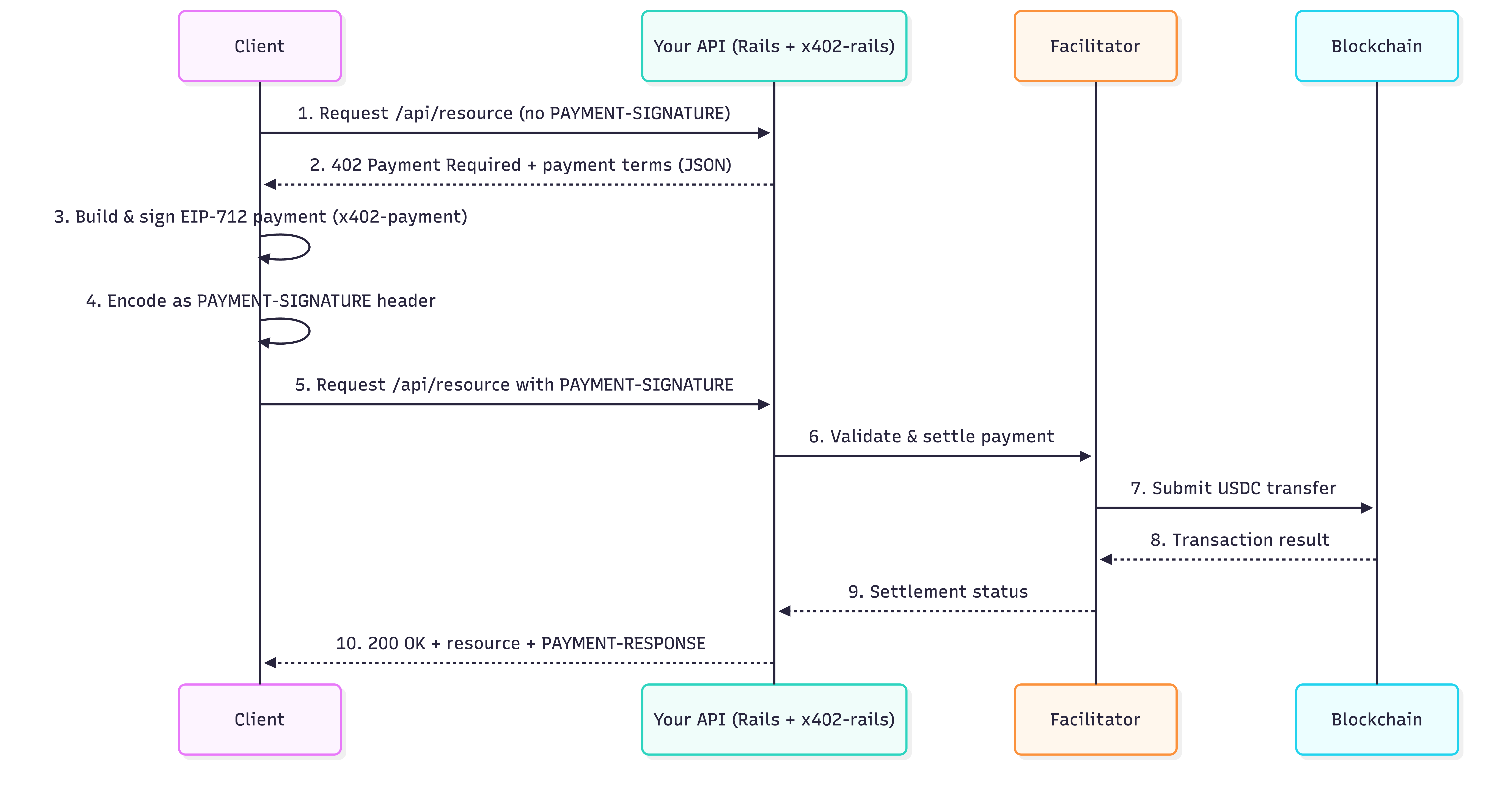
该协议以一个简单的循环方式工作。让我们一步步拆解它,然后再通过可视化图示来看:
- 客户端调用你的 API。
示例 API 调用
curl -i http://localhost:3000/api/weather/paywalled_info- 你的服务器返回 HTTP 402 Payment Required 和支付说明。
示例 Payment Required 响应
{
    "x402Version": 2,
    "error": "Payment required to access this resource",
    "resource": {
        "url": "http://localhost:3000/api/weather/paywalled_info",
        "description": "Payment required for /api/weather/paywalled_info",
        "mimeType": "application/json"
    },
    "accepts": [\
        {\
            "scheme": "exact",\
            "network": "eip155:84532", // Base Sepolia CAIP-2 网络标识符\
            "amount": "1000", // 最小单位金额(USDC 为 6 位小数)\
            "asset": "0x036CbD53842c5426634e7929541eC2318f3dCF7e", // Base Sepolia 上的 USDC 合约\
            "payTo": "YourWalletAddressHere", // 接收钱包\
            "maxTimeoutSeconds": 600,\
            "extra": {\
                "name": "USDC",\
                "version": "2"\
            }\
        }\
    ],
    "extensions": {}
}- 客户端使用 EIP-712 对支付授权进行签名,并将其编码为
PAYMENT-SIGNATUREheader。
示例 Payment Header
Payment Header (PAYMENT-SIGNATURE):
eyJ4NDAyVmVy... # Payment Authorization- 客户端携带该 header 重新发送请求。
带 Payment Header 的示例 API 调用
curl -i -H "PAYMENT-SIGNATURE: eyJ4NDAyVmVy..." http://localhost:3000/api/weather/paywalled_info- 你的服务器验证支付,在链上完成结算,并返回成功响应。
示例成功响应
{
    "temperature": 72,
    "condition": "sunny",
    "humidity": 65
}
为了在 Ruby 中简化这个流程,Quicknode 提供了两个 gem:
-
x402-rails(服务端):一个 Rails engine,提供 middleware 和 controller helper,帮助你轻松为 API 端点添加“paywall”。它负责处理签名验证和支付结算。
-
x402-payments(客户端):一个辅助库,用于生成消费 x402 驱动 API 所需的复杂 EIP-712 加密签名和
PAYMENT-SIGNATUREheader。
使用 x402 和 Ruby on Rails 的 Paywalled API
在本节中,我们将使用一个示例应用,并解释如何在你自己的 Rails 应用中设置和配置 x402。
Quicknode 的 qn-guide-examples 仓库中的这个 Rails 项目暴露了一个 Weather API 和一个 Premium API,访问天气数据需要支付 USDC。它演示了:
- 不需要支付的免费端点
- 返回 402 和支付要求的 paywalled 端点
- 同时支持 EVM 和 Solana 网络的多链支持
- 为速度或更强保证提供不同的结算模式
技术讲解
在深入代码之前,让我们先从高层次理解应用程序的流程。如果你对技术细节不感兴趣,可以直接跳到 Quick Start 部分。
x402 配置
x402-rails gem 在 config/initializers/x402.rb 中初始化。它会读取接收钱包、facilitator URL、链、货币和 optimistic 模式的环境变量,并设置你的全局配置。一个典型的配置如下:
config/initializers/x402.rb
## config/initializers/x402.rb
X402.configure do |config|
  # 你的钱包地址(支付将接收到这里)
  config.wallet_address = ENV.fetch("X402_WALLET_ADDRESS", "0xYourWalletAddressHere")

  # 负责链上结算的服务。
  # 使用公共 facilitator 或你自己的。
  config.facilitator    = ENV.fetch("X402_FACILITATOR_URL", "https://www.x402.org/facilitator")

  # 要使用的区块链网络
  config.chain = ENV.fetch("X402_CHAIN", "base-sepolia")

  # 支付货币(USDC 是标准)
  config.currency = ENV.fetch("X402_CURRENCY", "USDC")

  # 自定义链和 Token 注册
  config.register_chain(
    name: "polygon-amoy",
    chain_id: 80002,
    standard: "eip155"
  )

  config.register_token(
    chain: "polygon-amoy",
    symbol: "USDC",
    address: "0x41E94Eb019C0762f9Bfcf9Fb1E58725BfB0e7582",
    decimals: 6,
    name: "USDC",
    version: "2"
  )

  # ==========================================
  # 接受多个支付选项
  # ==========================================
  # 使用 config.accept() 指定接受哪些链/货币。
  # 402 响应将包含所有被接受的选项,从而允许客户端
  # 在任何受支持的链上进行支付。
  #
  # 如果没有进行 config.accept() 调用,则使用默认链/货币。

  config.accept(chain: "base-sepolia", currency: "USDC")
  config.accept(chain: "polygon-amoy", currency: "USDC")
  config.accept(chain: "solana-devnet", currency: "USDC")

  # 结算模式:
  # false(non-optimistic):等待链上确认
  # true(optimistic):立即响应,后台结算
  config.optimistic     = ENV.fetch("X402_OPTIMISTIC", "true") == "true"
end
这些设置告诉 x402-rails 应该把 USDC 支付接收到哪里、使用哪条链,以及是以 optimistic 方式响应还是等待结算。你也可以在 controller 中按端点覆盖这些设置,我们稍后会看到。
什么是 Facilitator?
facilitator 是 x402 支付流程中的关键组成部分。客户端发送带有签名支付授权的请求后,服务器会将该授权传递给 facilitator。然后 facilitator 会:
- 验证签名授权
- 构建实际的 USDC 转账交易
- 支付提交交易所需的 Gas fee
- 将交易发送到区块链
- 将结算详情返回给你的 API
这种设计使客户端无需自己提交区块链交易就能为 API 访问付费。它们只需要签署一条消息(不需要 RPC 调用、不需要 Gas 估算,也不需要钱包连接流程)。
你可以依赖 x402.org 提供的公共 facilitator,或者部署你自己的实例,以获得自定义结算行为、日志记录或对更多链的支持。
在 Controller 中强制 Paywall
为一个 API 端点添加 paywall 就像调用 x402_paywall helper 方法一样简单。x402-rails gem 会将这个 helper 注入到你的 controller 中,使你只需一行代码就能要求支付。在示例 WeatherController 中,paywalled_info action 在返回数据前会收取 $0.001 USDC。
app/controllers/api/weather_controller.rb
  class WeatherController < ApplicationController
    # Paywalled 端点(需要支付)
    def paywalled_info

      # 1. 要求支付:这一行保护该端点。
      # 如果支付缺失或无效,它将返回一个 402 响应。
      x402_paywall(amount: 0.001)

      # 2. 停止执行:如果 paywall 已渲染 402,则停止。
      return if performed?

      # 3. 访问数据:如果支付成功,继续执行。
      # 支付信息可在请求环境中获取。
      payment_info = request.env["x402.payment"]

      render json: {
        temperature: 72,
        condition: "sunny",
        humidity: 65,
        paid_by: payment_info&.[](:payer),
        payment_amount: payment_info&.[](:amount),
        network: payment_info&.[](:network),
        payment_info: payment_info
      }
    end

    # 免费端点(无 paywall)
    def public_info
      # 这个端点没有 paywall,是免费的。
      render json: {
        message: "This endpoint is free!",
        location: "San Francisco",
        timezone: "PST"
      }
    end
  end
路由
示例应用的路由定义在 config/routes.rb 中。这里将每个 API 端点(无论免费还是 paywalled)映射到对应的 controller action。Weather API 展示了直接使用 x402_paywall,而 Premium API 则使用 before_action 将 paywall 应用于多个端点。
config/routes.rb
Rails.application.routes.draw do
  # 按照 https://guides.rubyonrails.org/routing.html 中的 DSL 定义你的应用路由

  # 在 /up 上暴露健康状态:如果应用启动时没有异常则返回 200,否则返回 500。
  # 可被负载均衡器和可用性监控器用于验证应用是否在线。
  get "up" => "rails/health#show", as: :rails_health_check

  # x402 Payment Protocol 测试端点
  namespace :api do
    # Weather API 端点(直接使用 x402_paywall)
    get "weather/paywalled_info", to: "weather#paywalled_info"
    get "weather/paywalled_info_sol", to: "weather#paywalled_info_sol"
    get "weather/forecast", to: "weather#forecast"
    get "weather/public", to: "weather#public_info"

    # Premium API 端点(使用 before_action)
    resources :premium, only: [ :index, :show ] do
      collection do
        get :free
      end
    end
  end
替代 Paywall 方式(可选)
如果多个端点需要相同的支付逻辑,你不需要在每个 action 中重复 x402_paywall。相反,你可以使用 before_action 过滤器一次性应用它。这正是 Premium API(app/controllers/api/premium_controller.rb)的结构方式;它将同一个 paywall 应用于多个 action,从而保持 controller 简洁且一致。
app/controllers/api/premium_controller.rb
module Api
  class PremiumController < ApplicationController
    # 将 paywall 应用于多个 action(show 和 index)的示例
    before_action :require_payment, only: [:show, :index]

    def index
      payment_info = request.env["x402.payment"]

      render json: {
        message: "Premium content list",
        items: ["Item 1", "Item 2", "Item 3"],
        paid_by: payment_info&.[](:payer)
      }
    end

    def show
      payment_info = request.env["x402.payment"]

      render json: {
        message: "Premium content details",
        id: params[:id],
        content: "This is premium content that requires payment",
        paid_by: payment_info&.[](:payer)
      }
    end

    def free
      render json: {
        message: "This premium controller endpoint is free",
        sample: "Here's a sample"
      }
    end

    private

    def require_payment
      x402_paywall(amount: 0.005, chain: "eip155:84532")
    end
  end
end
多链支持(可选)
x402 协议被设计为可跨多个区块链网络工作,并且每个端点都可以指定自己的链设置。这使你能够根据用例灵活地在不同网络上接受支付。
在示例应用中,WeatherController 的 paywalled_info_sol 端点要求在 Solana devnet 上支付,它通过将默认链覆盖为 solana-devnet 来实现。
app/controllers/api/weather_controller.rb
module Api
  class WeatherController < ApplicationController
    def paywalled_info_sol
      x402_paywall(
        amount: 0.001,
        chain: "solana:EtWTRABZaYq6iMfeYKouRu166VU2xqa1", # Solana devnet CAIP-2 标识符
        currency: "USDC",
        solana_fee_payer: "FuzoZt4zXaYLvXRguKw2T6xvKvzZqv6PkmaFjNrEG7jm",
        wallet_address: "EYNQARNg9gZTtj1xMMrHK7dRFAkVjAAMubxaH7Do8d9Y"
      )
      # ...
    end
  end
end
处理支付错误(可选)
为了提供清晰的错误消息,你可以捕获 x402-rails 抛出的特定异常。这已经在 app/controllers/application_controller.rb 中设置好了。
app/controllers/application_controller.rb
class ApplicationController < ActionController::API
  # 应用范围的 x402 错误处理
  rescue_from X402::InvalidPaymentError, with: :render_payment_error
  rescue_from X402::FacilitatorError, with: :render_facilitator_error
  rescue_from X402::ConfigurationError, with: :render_config_error

  private

  def render_payment_error(exception)
    render json: {
      error: "Payment Error",
      message: exception.message,
      type: "invalid_payment",
      status: 402
    }, status: :payment_required
  end

  def render_facilitator_error(exception)
    Rails.logger.error("[x402] Facilitator error: #{exception.message}")

    render json: {
      error: "Payment Service Unavailable",
      message: "Unable to process payment. Please try again.",
      type: "facilitator_error",
      status: 503
    }, status: :service_unavailable
  end

  def render_config_error(exception)
    Rails.logger.fatal("[x402] Configuration error: #{exception.message}")

    render json: {
      error: "Service Configuration Error",
      message: "Payment system not properly configured",
      status: 500
    }, status: :internal_server_error
  end
end
我们已经介绍了将 x402 支付集成到 Ruby on Rails 应用中的关键技术方面。现在,让我们开始使用这个示例项目。
快速开始
首先,克隆 Quicknode 示例项目:
第 1 步:克隆并安装依赖
## 克隆仓库
git clone https://github.com/quiknode-labs/qn-guide-examples.git
cd qn-guide-examples/rails/x402-micropayments

## 安装依赖
bundle install
第 2 步:配置环境变量
将 .env.example 文件复制为 .env,并更新以下变量。详情请参见文件中的注释。
cp .env.example .env第 3 步:启动服务器
启动服务器:
bin/rails server -p 3000你的 API 现在已经运行在 http://localhost:3000。现在,我们需要学习如何生成有效的支付签名来访问 paywalled 端点。
生成 x402 客户端支付
如前所述,客户端需要生成一个有效的支付签名(PAYMENT-SIGNATURE header)来访问 paywalled 端点。示例项目包含了使用不同语言编写的简单脚本,用于为不同用例生成支付签名:
- Ruby:
generate-payment.rb - TypeScript:
generate-payment.ts - Python:
generate-payment.py
本指南将使用 Ruby 脚本,但其他语言的过程类似,更多细节可以在项目的 README 文件中找到。
使用 Ruby 支付生成器
该脚本使用 bundler/inline 自动安装必要的依赖,因此你无需单独设置 Gemfile。
配置并生成 Header
该脚本使用客户端私钥(来自你的 .env 文件)配置 x402-payments gem,然后通过所需参数调用 generate_header。
generate_payment.rb
## ...(请参见项目中的完整脚本)

## 如果存在则加载 .env 文件
require 'dotenv'
Dotenv.load

## 配置
PRIVATE_KEY = ENV.fetch('X402_TEST_PRIVATE_KEY', '0xYourPrivateKeyHere')
PORT = ENV.fetch('PORT', '3000')
PAY_TO = ENV.fetch('X402_WALLET_ADDRESS', 'YourWalletAddressHere')
CHAIN = ENV.fetch('X402_CHAIN', 'base-sepolia')

## 配置 x402-payments gem
X402::Payments.configure do |config|
  config.private_key = PRIVATE_KEY
  config.chain = CHAIN
  config.default_pay_to = PAY_TO
  config.max_timeout_seconds = 600
end

## 生成支付 header
## gem 会在内部处理所有 EIP-712 签名
begin
  payment_header = X402::Payments.generate_header(
    amount: 0.001,  # 0.001 美元
    resource: "http://localhost:#{PORT}/api/weather/paywalled_info",
    description: "Payment required for /api/weather/paywalled_info"
  )
end

## ...(请参见项目中的完整脚本)
运行脚本
现在,运行脚本:
ruby generate_payment.rb脚本会输出 payment header,你可以在客户端中使用它。
注意: 脚本中支付的最大超时时间被设置为 600 秒。你可以根据自己的用例调整这个值。否则,支付将在 600 秒后过期。
测试 Paywall
由于我们已经设置好了服务器和支付生成器,现在可以测试完整的支付流程,并了解 x402 在实践中是如何工作的。
为你的钱包注资
为了测试支付,你需要在 Base Sepolia 测试网上有一些测试 USDC。你可以从 Circle USDC faucet 获取一些免费的测试 USDC。
Paywalled 端点
首先,尝试在没有 payment header 的情况下访问 paywalled 端点:
curl -i http://localhost:3000/api/weather/paywalled_info你应该会收到一个 402 响应,包含以下 JSON payload:
{
    "x402Version": 2,
    "error": "Payment required to access this resource",
    "resource": {
        "url": "http://localhost:3000/api/weather/paywalled_info",
        "description": "Payment required for /api/weather/paywalled_info",
        "mimeType": "application/json"
    },
    "accepts": [\
        {\
            "scheme": "exact",\
            "network": "eip155:84532",\
            "amount": "1000",\
            "asset": "Asset Contract Address", // 例如,Base Sepolia 上的 USDC\
            "payTo": "Recipient Address", // 接收钱包\
            "maxTimeoutSeconds": 600,\
            "extra": {\
                "name": "USDC",\
                "version": "2"\
            }\
        }\
    ],
    "extensions": {}
}
现在,使用 Ruby 脚本(或你偏好的支付生成器)生成的 payment header 来访问 paywalled 端点:
curl -i -H "PAYMENT-SIGNATURE: eyJ4NDAyVmVy..." http://localhost:3000/api/weather/paywalled_info你应该会收到一个 200 响应,包含以下 JSON payload:
{
    "temperature": 72,
    "condition": "sunny",
    "humidity": 65,
    "paid_by": "0x...",
    "payment_amount": "1000",
    "network": "base-sepolia"
    // ...
}
恭喜!你已经成功将 x402 支付集成到你的 Ruby on Rails 应用中。现在你可以使用 payment header 来访问 paywalled 端点,并享受 micropayments 带来的优势。
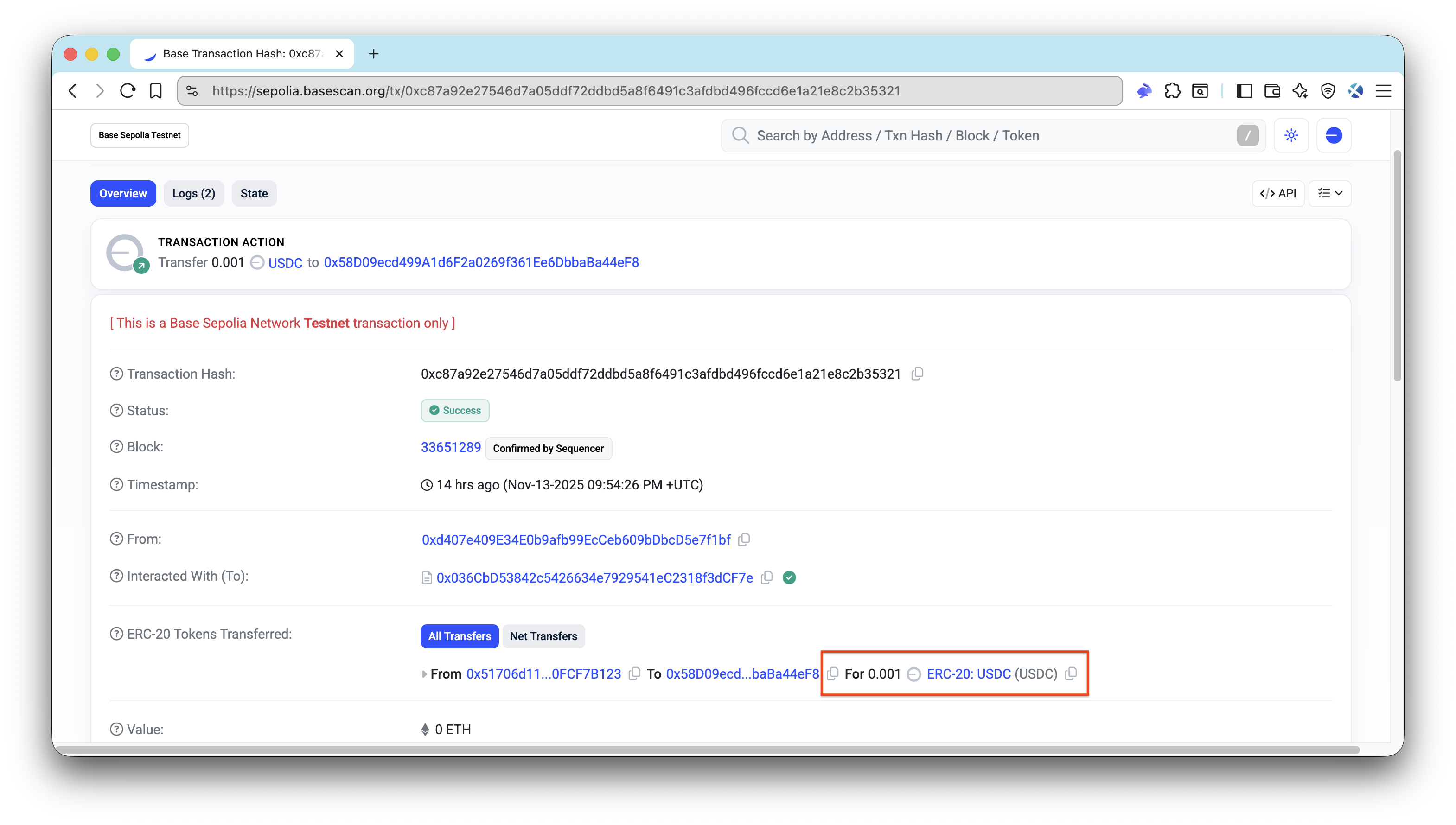
使用区块链浏览器(例如 Base Sepolia Explorer)来验证支付交易是否已成功在区块链上结算。
免费端点
你也可以尝试访问免费端点:
curl -i http://localhost:3000/api/weather/public该端点不需要 payment header,因此你应该会收到一个 200 响应,包含以下 JSON payload:
{
    "message": "This endpoint is free!",
    "location": "San Francisco",
    "timezone": "PST"
}
结论
你现在已经对 x402、x402-rails 和 x402-payments 如何在真实 Rails 应用中协同工作有了可运行的理解。
接下来,你可以:
- 实现你自己的业务逻辑
- 为每个端点或每种 HTTP 方法引入不同的价格
- 在准备好投入生产后,从测试网切换到主网
- 探索自行托管 facilitator 以获得更多控制权
如果你遇到困难或有问题,可以在我们的 Discord 中留言。通过关注我们的 X(@Quicknode)或 Telegram 公告频道 来获取最新动态。
我们 ❤️ 反馈!
如果你有任何反馈或新主题请求,请告诉我们。我们很希望听到你的声音。
- 原文链接: quicknode.com/guides/age...
- 登链社区 AI 助手,为大家转译优秀英文文章,如有翻译不通的地方,还请包涵~