从零打造经典护眼助手桌面程序:Tauri 实战指南
- King
- 发布于 2025-12-18 20:35
- 阅读 1080
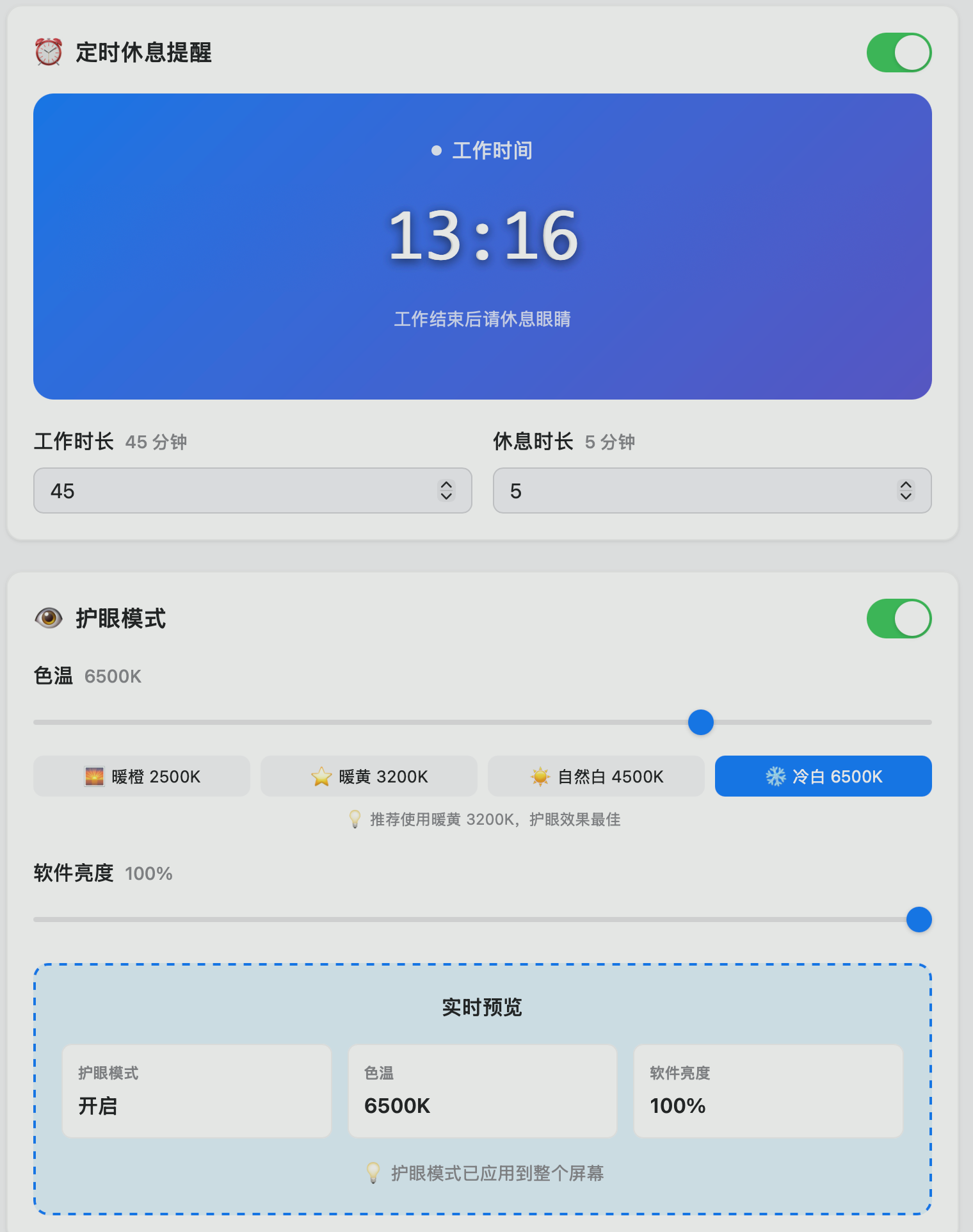
本文将手把手教你如何从零开始构建一个功能完整的护眼助手桌面应用,涵盖护眼模式、定时休息提醒等核心功能,并深入解析技术实现细节。目录项目概览技术选型环境准备项目初始化前端实现后端Rust核心系统级功能部署打包常见问题拓展思路项目概览护眼助手是一个现代化的眼部健康保护
本文将手把手教你如何从零开始构建一个功能完整的护眼助手桌面应用,涵盖护眼模式、定时休息提醒等核心功能,并深入解析技术实现细节。
目录
项目概览
护眼助手是一个现代化的眼部健康保护应用,主要功能包括:
- 🛡️ 智能护眼模式:动态调节屏幕色温和亮度
- ⏰ 定时休息提醒:科学工作休息节奏管理
- 🌊 酷炫休息屏保:让休息时间更有趣
- 🔔 系统通知:智能提醒用户休息
技术架构图
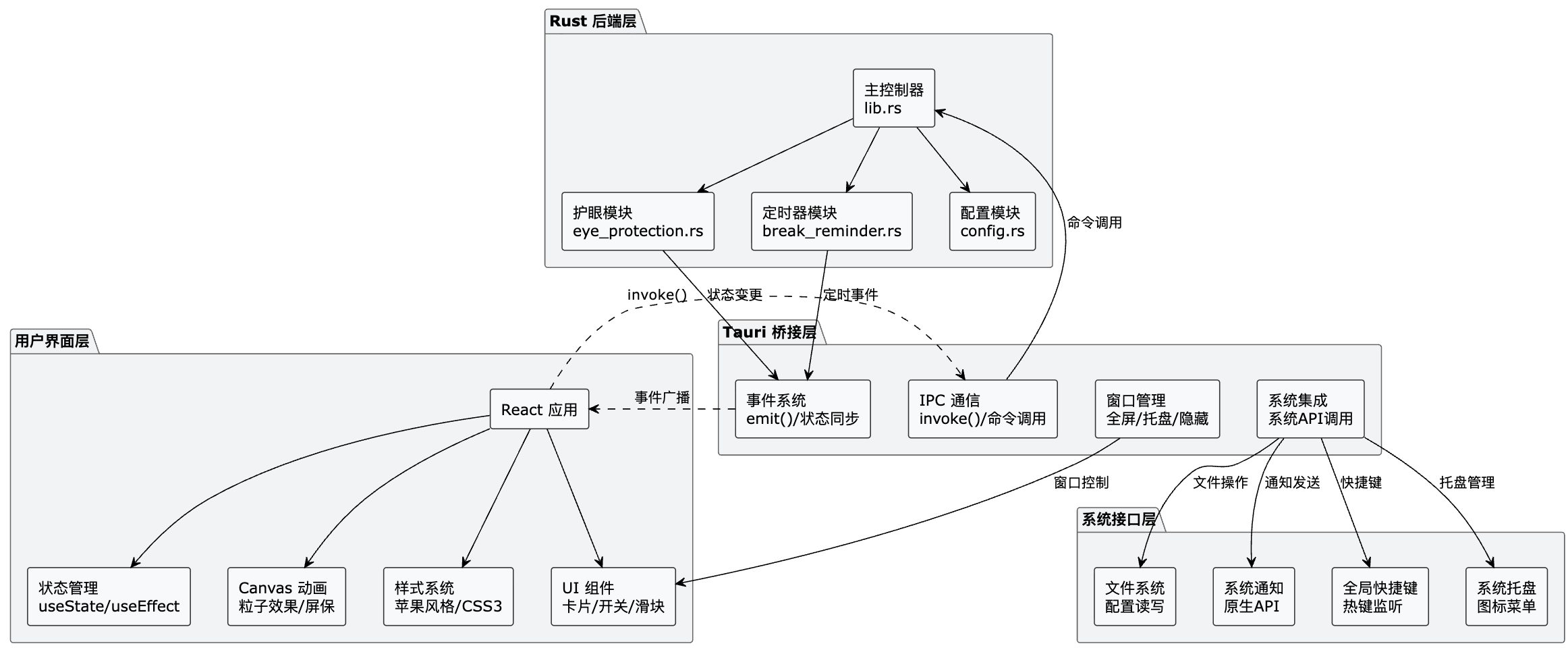
架构说明:
- 用户界面层:基于 React + CSS3 + Canvas 构建现代化界面
- Tauri 桥接层:提供前后端通信、事件系统和窗口管理
- Rust 后端层:核心业务逻辑,包括护眼、定时器和配置管理
- 系统接口层:与操作系统交互,提供原生功能支持
数据流向:
- 用户操作 → React组件 → Tauri命令 → Rust处理 → 系统调用
- 状态更新 → Rust事件 → Tauri事件 → React状态 → 界面刷新
技术选型
前端技术栈
- React 19:现代化UI框架,提供强大的状态管理和组件化能力
- Vite:极速的构建工具,热更新体验极佳
- CSS3:原生CSS实现苹果风格设计,避免过度依赖UI库
后端技术栈
- Rust:系统级性能,内存安全,跨平台支持
- Tauri 2:轻量级跨平台应用框架,替代Electron的更优选择
- Tokio:异步运行时,处理定时器和并发任务
关键依赖
// package.json
{
  "dependencies": {
    "@tauri-apps/api": "^2",
    "@tauri-apps/plugin-notification": "~2.3.3",
    "react": "^19.1.0"
  }
}
# Cargo.toml
[dependencies]
tauri = { version = "2", features = ["tray-icon"] }
tokio = { version = "1", features = ["time", "sync"] }
serde = { version = "1", features = ["derive"] }环境准备
1. 安装 Rust 环境
# 安装 Rust
curl --proto '=https' --tlsv1.2 -sSf https://sh.rustup.rs | sh
source ~/.cargo/env

# 验证安装
rustc --version
2. 安装 Node.js 和包管理器
# 推荐使用 pnpm
npm install -g pnpm

# 或使用 npm/yarn
npm --version
3. 安装 Tauri CLI
pnpm add -g @tauri-apps/cli

# 或通过 cargo 安装
cargo install tauri-cli
4. 系统依赖(macOS)
# macOS 开发依赖
xcode-select --install
项目初始化
1. 创建 Tauri 项目
# 使用 create-tauri-app 脚手架
pnpm create tauri-app optic-vision --template react-ts

# 进入项目目录
cd optic-vision
2. 项目结构说明
optic-vision/
├── src/                    # 前端源码
│   ├── App.jsx            # 主应用组件
│   ├── main.jsx           # React 入口
│   └── App.css            # 样式文件
├── src-tauri/              # Rust 后端
│   ├── src/
│   │   ├── main.rs        # 程序入口
│   │   ├── lib.rs         # 核心库
│   │   ├── eye_protection.rs  # 护眼模块
│   │   ├── break_reminder.rs  # 定时休息模块
│   │   └── config.rs      # 配置管理
│   ├── Cargo.toml         # Rust 依赖配置
│   └── tauri.conf.json    # Tauri 应用配置
├── package.json           # 前端依赖
└── vite.config.js         # Vite 构建配置
3. 配置文件设置
Tauri 配置 (src-tauri/tauri.conf.json)
{
  "$schema": "https://schema.tauri.app/config/2",
  "productName": "护眼助手",
  "version": "0.1.0",
  "identifier": "com.optic-vision.eyecare",
  "app": {
    "windows": [
      {
        "title": "护眼助手",
        "width": 800,
        "height": 600,
        "visible": false,
        "decorations": true,
        "skipTaskbar": true
      }
    ]
  }
}
前端实现
1. 应用主组件架构
// src/App.jsx 核心结构
function App() {
  // 状态管理
  const [isEyeProtectionEnabled, setIsEyeProtectionEnabled] = useState(false);
  const [isBreakReminderEnabled, setIsBreakReminderEnabled] = useState(false);
  const [colorTemperature, setColorTemperature] = useState(6500);
  const [remainingTime, setRemainingTime] = useState(45 * 60);

  // 事件监听
  useEffect(() => {
    // 监听后端休息提醒事件
    const unlisten = listen("break_reminder", (event) => {
      const state = event.payload;
      setRemainingTime(state.remaining_time);
      setIsBreakTime(state.is_break_time);
    });
    return () => unlisten.then(fn => fn());
  }, []);

  return (
    <>
      {/* 护眼模式全屏覆盖层 */}
      {isEyeProtectionEnabled && <EyeProtectionOverlay />}

      {/* 全屏休息屏幕 */}
      {showBreakScreen && <BreakScreenSaver />}

      {/* 主界面内容 */}
      <div className="container">
        <EyeProtectionCard />
        <BreakReminderCard />
      </div>
    </>
  );
}
2. 护眼模式组件
// 护眼模式卡片实现
function EyeProtectionCard() {
  const [isEyeProtectionEnabled, setIsEyeProtectionEnabled] = useState(false);
  const [colorTemperature, setColorTemperature] = useState(6500);
  const [softwareBrightness, setSoftwareBrightness] = useState(100);

  // 切换护眼模式
  const toggleEyeProtection = async () => {
    try {
      const newState = await invoke("toggle_eye_protection");
      setIsEyeProtectionEnabled(newState.is_enabled);
    } catch (err) {
      console.error("Error toggling eye protection:", err);
    }
  };

  // 色温调节
  const handleColorTemperatureChange = async (e) => {
    const newTemperature = parseFloat(e.target.value);
    setColorTemperature(newTemperature);
    await invoke("set_color_temperature", { temperature: newTemperature });
  };

  return (
    <div className="card">
      <div className="card-header">
        <div className="card-title">
          <span className="card-icon">👁️</span>
          护眼模式
        </div>
        <label className="switch">
          <input
            type="checkbox"
            checked={isEyeProtectionEnabled}
            onChange={toggleEyeProtection}
          />
          <span className="toggle"></span>
        </label>
      </div>

      {/* 色温滑块控制 */}
      <div className="control-group">
        <label className="control-label">
          色温
          <span className="control-value">{colorTemperature}K</span>
        </label>
        <input
          type="range"
          min="2000"
          max="8000"
          step="100"
          value={colorTemperature}
          onChange={handleColorTemperatureChange}
          className="slider"
        />
      </div>
    </div>
  );
}
3. 全屏休息屏保组件
// 酷炫休息屏保实现
function BreakScreenSaver({ remainingTime, onEnd }) {
  const canvasRef = useRef(null);
  const particlesRef = useRef([]);

  useEffect(() => {
    const canvas = canvasRef.current;
    const ctx = canvas.getContext('2d');
    canvas.width = window.innerWidth;
    canvas.height = window.innerHeight;

    // 粒子类定义
    class Particle {
      constructor() {
        this.reset();
      }

      reset() {
        this.x = Math.random() * canvas.width;
        this.y = Math.random() * canvas.height;
        this.size = Math.random() * 3 + 1;
        this.speedX = Math.random() * 2 - 1;
        this.speedY = Math.random() * 2 - 1;
        this.opacity = Math.random() * 0.5 + 0.3;
        this.color = `hsla(${Math.random() * 60 + 180}, 70%, 60%, ${this.opacity})`;
      }

      update() {
        this.x += this.speedX;
        this.y += this.speedY;
        // 边界反弹
        if (this.x < 0 || this.x > canvas.width) this.speedX *= -1;
        if (this.y < 0 || this.y > canvas.height) this.speedY *= -1;
      }

      draw() {
        ctx.beginPath();
        ctx.arc(this.x, this.y, this.size, 0, Math.PI * 2);
        ctx.fillStyle = this.color;
        ctx.fill();
      }
    }

    // 初始化粒子
    for (let i = 0; i < 100; i++) {
      particlesRef.current.push(new Particle());
    }

    // 动画循环
    const animate = () => {
      // 渐变背景
      const gradient = ctx.createLinearGradient(0, 0, canvas.width, canvas.height);
      gradient.addColorStop(0, 'hsla(200, 70%, 30%, 1)');
      gradient.addColorStop(1, 'hsla(220, 70%, 40%, 1)');
      ctx.fillStyle = gradient;
      ctx.fillRect(0, 0, canvas.width, canvas.height);

      // 绘制粒子
      particlesRef.current.forEach((particle, index) => {
        particle.update();
        particle.draw();

        // 粒子连线效果
        for (let j = index + 1; j < particlesRef.current.length; j++) {
          const other = particlesRef.current[j];
          const dx = particle.x - other.x;
          const dy = particle.y - other.y;
          const distance = Math.sqrt(dx * dx + dy * dy);

          if (distance < 100) {
            ctx.beginPath();
            ctx.strokeStyle = `rgba(255, 255, 255, ${0.15 * (1 - distance / 100)})`;
            ctx.lineWidth = 0.5;
            ctx.moveTo(particle.x, particle.y);
            ctx.lineTo(other.x, other.y);
            ctx.stroke();
          }
        }
      });

      requestAnimationFrame(animate);
    };

    animate();
  }, []);

  return (
    <div style={{ position: 'fixed', top: 0, left: 0, width: '100vw', height: '100vh' }} onClick={onEnd}>
      <canvas ref={canvasRef} style={{ position: 'absolute', top: 0, left: 0, width: '100%', height: '100%' }} />

      {/* 倒计时显示 */}
      <div style={{ position: 'relative', zIndex: 1, display: 'flex', flexDirection: 'column', justifyContent: 'center', alignItems: 'center', height: '100%', color: 'white' }}>
        <h1 style={{ fontSize: '56px', marginBottom: '24px' }}>休息时间</h1>
        <div style={{ fontSize: '120px', fontWeight: '700', marginBottom: '32px' }}>
          {formatTime(remainingTime)}
        </div>
        <p>点击屏幕结束休息</p>
      </div>
    </div>
  );
}
4. 护眼模式覆盖层实现
// 护眼模式全屏覆盖
function EyeProtectionOverlay({ isEyeProtectionEnabled, colorTemperature, softwareBrightness }) {
  if (!isEyeProtectionEnabled) return null;

  // 色温到颜色的映射算法
  const getOverlayColor = () => {
    let hue, saturation;
    if (colorTemperature <= 3000) {
      // 2000K-3000K: 橙色到黄色
      hue = 30 + (colorTemperature - 2000) / 1000 * 15;
      saturation = 80 - (colorTemperature - 2000) / 1000 * 20;
    } else if (colorTemperature <= 4500) {
      // 3000K-4500K: 黄色到自然白
      hue = 45 + (colorTemperature - 3000) / 1500 * 5;
      saturation = 60 - (colorTemperature - 3000) / 1500 * 40;
    } else {
      // 4500K+: 自然白到冷白
      hue = 50 + (colorTemperature - 4500) / 3500 * 150;
      saturation = Math.max(5, 20 - (colorTemperature - 4500) / 3500 * 15);
    }

    const lightness = 30 + (100 - softwareBrightness) / 100 * 20;
    return `hsl(${hue}, ${saturation}%, ${lightness}%)`;
  };

  return (
    <div
      style={{
        position: 'fixed',
        top: 0,
        left: 0,
        width: '100vw',
        height: '100vh',
        backgroundColor: getOverlayColor(),
        opacity: colorTemperature <= 4500 ? 0.25 : 0.15,
        pointerEvents: 'none',
        zIndex: 999,
        transition: 'all 0.3s ease',
      }}
    />
  );
}
5. 苹果风格样式设计
/* src/App.css - 苹果风格设计 */

/* 全局样式 */
* {
  margin: 0;
  padding: 0;
  box-sizing: border-box;
}

body {
  font-family: -apple-system, BlinkMacSystemFont, 'Segoe UI', Roboto, sans-serif;
  background: #f5f5f7;
  color: #1d1d1f;
  line-height: 1.6;
}

/* 卡片样式 */
.card {
  background: white;
  border-radius: 12px;
  padding: 20px;
  box-shadow: 0 1px 3px rgba(0, 0, 0, 0.1);
  border: 1px solid rgba(0, 0, 0, 0.05);
}

.card-header {
  display: flex;
  align-items: center;
  justify-content: space-between;
  margin-bottom: 16px;
}

.card-title {
  font-size: 18px;
  font-weight: 600;
  color: #1d1d1f;
  display: flex;
  align-items: center;
  gap: 8px;
}

/* iOS 风格开关 */
.switch {
  position: relative;
  display: inline-block;
  width: 51px;
  height: 31px;
}

.switch input {
  opacity: 0;
  width: 0;
  height: 0;
}

.toggle {
  position: absolute;
  cursor: pointer;
  top: 0;
  left: 0;
  right: 0;
  bottom: 0;
  background: #e5e5e7;
  transition: 0.3s;
  border-radius: 31px;
}

.toggle:before {
  position: absolute;
  content: "";
  height: 27px;
  width: 27px;
  left: 2px;
  bottom: 2px;
  background: white;
  transition: 0.3s;
  border-radius: 50%;
  box-shadow: 0 1px 3px rgba(0, 0, 0, 0.2);
}

input:checked + .toggle {
  background: #34c759;
}

input:checked + .toggle:before {
  transform: translateX(20px);
}

/* 滑块样式 */
.slider {
  -webkit-appearance: none;
  width: 100%;
  height: 4px;
  background: #e5e5e7;
  border-radius: 2px;
  outline: none;
  margin: 12px 0;
}

.slider::-webkit-slider-thumb {
  -webkit-appearance: none;
  appearance: none;
  width: 20px;
  height: 20px;
  background: #007aff;
  border-radius: 50%;
  cursor: pointer;
  box-shadow: 0 1px 3px rgba(0, 0, 0, 0.2);
}

/* 时间显示卡片 */
.timer-display {
  text-align: center;
  padding: 32px 20px;
  background: linear-gradient(135deg, #007aff, #5856d6);
  border-radius: 16px;
  color: white;
  margin-bottom: 20px;
}

.timer-time {
  font-size: 48px;
  font-weight: 700;
  font-family: -apple-system-monospace, 'SF Mono', Monaco, monospace;
  margin: 16px 0;
  text-shadow: 0 2px 8px rgba(0, 0, 0, 0.2);
}
后端Rust核心
1. 应用状态管理
// src-tauri/src/lib.rs
use std::sync::Arc;
use tauri::Manager;
use tokio::sync::Mutex;

// 全局状态管理
pub struct AppState {
    pub eye_protection: Mutex<EyeProtectionState>,
    pub break_reminder: Mutex<BreakReminderState>,
    pub timer_running: Mutex<bool>,
}

// 护眼模式状态
#[derive(Debug, Clone, serde::Serialize, serde::Deserialize)]
pub struct EyeProtectionState {
    pub is_enabled: bool,
    pub color_temperature: f32, // 色温值,范围从 2000K 到 8000K
    pub brightness: f32,        // 软件亮度调整,范围从 0.0 到 1.0
}

impl Default for EyeProtectionState {
    fn default() -> Self {
        Self {
            is_enabled: false,
            color_temperature: 6500.0, // 标准色温
            brightness: 1.0,           // 最大亮度
        }
    }
}

// 定时休息提醒状态
#[derive(Debug, Clone, serde::Serialize, serde::Deserialize)]
pub struct BreakReminderState {
    pub is_enabled: bool,
    pub work_duration: u32,         // 工作时长(分钟)
    pub break_duration: u32,        // 休息时长(分钟)
    pub remaining_time: u32,        // 剩余时间(秒)
    pub is_break_time: bool,        // 是否处于休息时间
    pub is_break_modal_shown: bool, // 是否显示休息提醒弹窗
}

impl Default for BreakReminderState {
    fn default() -> Self {
        Self {
            is_enabled: true,
            work_duration: 45,
            break_duration: 5,
            remaining_time: 45 * 60,
            is_break_time: false,
            is_break_modal_shown: false,
        }
    }
}
2. 护眼模式模块
// src-tauri/src/eye_protection.rs
use std::sync::Arc;
use tauri::State;

#[tauri::command]
pub async fn toggle_eye_protection(
    state: State<'_, Arc<crate::AppState>>,
) -> Result<EyeProtectionState, String> {
    let mut guard = state.eye_protection.lock().await;
    guard.is_enabled = !guard.is_enabled;
    let result = guard.clone();
    drop(guard);

    // 保存配置
    if let Err(e) = crate::config::save_config_internal(state.inner().clone()).await {
        eprintln!("保存配置失败: {}", e);
    }

    Ok(result)
}

#[tauri::command]
pub async fn set_color_temperature(
    state: State<'_, Arc<crate::AppState>>,
    temperature: f32,
) -> Result<EyeProtectionState, String> {
    let mut guard = state.eye_protection.lock().await;
    guard.color_temperature = temperature.clamp(2000.0, 8000.0);
    let result = guard.clone();
    drop(guard);

    if let Err(e) = crate::config::save_config_internal(state.inner().clone()).await {
        eprintln!("保存配置失败: {}", e);
    }

    Ok(result)
}

#[tauri::command]
pub async fn set_software_brightness(
    state: State<'_, Arc<crate::AppState>>,
    brightness: f32,
) -> Result<EyeProtectionState, String> {
    let mut guard = state.eye_protection.lock().await;
    guard.brightness = brightness.clamp(0.0, 1.0);
    let result = guard.clone();
    drop(guard);

    if let Err(e) = crate::config::save_config_internal(state.inner().clone()).await {
        eprintln!("保存配置失败: {}", e);
    }

    Ok(result)
}

#[tauri::command]
pub async fn get_eye_protection_state(
    state: State<'_, Arc<crate::AppState>>,
) -> Result<EyeProtectionState, String> {
    let guard = state.eye_protection.lock().await;
    Ok(guard.clone())
}
3. 定时休息模块
// src-tauri/src/break_reminder.rs
use std::sync::Arc;
use tauri::{AppHandle, Emitter, Manager, State};
use tokio::time::{sleep, Duration};

// 定时器状态枚举
enum TimerState {
    Idle,           // 空闲状态
    Working,        // 工作状态
    BreakPending,   // 休息待处理
    Breaking,       // 休息中
}

// 发送系统通知
async fn send_notification(app_handle: &AppHandle, title: &str, body: &str) -> bool {
    let _ = app_handle.notification().request_permission();

    match app_handle
        .notification()
        .builder()
        .title(title)
        .body(body)
        .show()
    {
        Ok(_) => {
            println!("Tauri通知发送成功: {}", title);
            true
        }
        Err(e) => {
            eprintln!("Tauri通知发送失败: {}", e);
            false
        }
    }
}

// 设置全屏模式
async fn set_fullscreen_mode(app_handle: &AppHandle, fullscreen: bool) {
    if let Some(window) = app_handle.get_webview_window("main") {
        if let Err(e) = window.set_fullscreen(fullscreen) {
            let mode = if fullscreen { "enter" } else { "exit" };
            eprintln!("Failed to {} fullscreen: {}", mode, e);
        }
    }
}

// 核心定时器逻辑
pub async fn start_break_timer(app_handle: Arc<AppHandle>, state: Arc<crate::AppState>) {
    let mut timer_running = state.timer_running.lock().await;
    if *timer_running {
        return;
    }
    *timer_running = true;
    drop(timer_running);

    let mut current_state = TimerState::Idle;

    loop {
        // 检查定时器是否启用
        let is_enabled = {
            let break_reminder = state.break_reminder.lock().await;
            break_reminder.is_enabled
        };

        if !is_enabled {
            let mut timer_running = state.timer_running.lock().await;
            *timer_running = false;
            break;
        }

        // 状态机处理
        current_state = match current_state {
            TimerState::Idle => {
                // 初始化工作状态
                let mut break_reminder = state.break_reminder.lock().await;
                break_reminder.is_break_time = false;
                break_reminder.remaining_time = break_reminder.work_duration * 60;
                let new_state = break_reminder.clone();
                drop(break_reminder);

                app_handle.emit("break_reminder", new_state).unwrap_or_default();
                TimerState::Working
            }
            TimerState::Working => {
                // 工作倒计时逻辑
                let mut current_remaining = {
                    let break_reminder = state.break_reminder.lock().await;
                    break_reminder.remaining_time
                };

                loop {
                    // 检查是否需要切换状态
                    let is_break_time = {
                        let break_reminder = state.break_reminder.lock().await;
                        break_reminder.is_break_time
                    };

                    if is_break_time {
                        break;
                    }

                    if current_remaining == 0 {
                        // 工作时间结束,进入休息
                        let mut break_reminder = state.break_reminder.lock().await;
                        break_reminder.is_break_time = true;
                        break_reminder.remaining_time = break_reminder.break_duration * 60;
                        let new_state = break_reminder.clone();
                        drop(break_reminder);

                        // 发送通知
                        send_notification(&app_handle, "护眼助手", "工作时间结束,该休息一下啦!").await;

                        // 进入全屏休息模式
                        set_fullscreen_mode(&app_handle, true).await;

                        app_handle.emit("break_reminder", new_state).unwrap_or_default();
                        break TimerState::Breaking;
                    }

                    // 更新倒计时
                    current_remaining -= 1;
                    {
                        let mut break_reminder = state.break_reminder.lock().await;
                        break_reminder.remaining_time = current_remaining;
                        let new_state = break_reminder.clone();
                        drop(break_reminder);

                        app_handle.emit("break_reminder", new_state).unwrap_or_default();
                    }

                    sleep(Duration::from_secs(1)).await;
                }

                TimerState::Working
            }
            TimerState::Breaking => {
                // 休息倒计时逻辑
                let mut current_remaining = {
                    let break_reminder = state.break_reminder.lock().await;
                    break_reminder.remaining_time
                };

                loop {
                    // 检查是否需要切换状态
                    let is_break_time = {
                        let break_reminder = state.break_reminder.lock().await;
                        break_reminder.is_break_time
                    };

                    if !is_break_time {
                        break;
                    }

                    if current_remaining == 0 {
                        // 休息时间结束,回到工作
                        let mut break_reminder = state.break_reminder.lock().await;
                        break_reminder.is_break_time = false;
                        break_reminder.remaining_time = break_reminder.work_duration * 60;
                        let new_state = break_reminder.clone();
                        drop(break_reminder);

                        // 退出全屏模式
                        set_fullscreen_mode(&app_handle, false).await;

                        app_handle.emit("break_reminder", new_state).unwrap_or_default();
                        break TimerState::Working;
                    }

                    // 更新倒计时
                    current_remaining -= 1;
                    {
                        let mut break_reminder = state.break_reminder.lock().await;
                        break_reminder.remaining_time = current_remaining;
                        let new_state = break_reminder.clone();
                        drop(break_reminder);

                        app_handle.emit("break_reminder", new_state).unwrap_or_default();
                    }

                    sleep(Duration::from_secs(1)).await;
                }

                TimerState::Breaking
            }
            _ => TimerState::Idle,
        };
    }
}

// Tauri 命令实现
#[tauri::command]
pub async fn toggle_break_reminder(
    app_handle: AppHandle,
    state: State<'_, Arc<crate::AppState>>,
) -> Result<BreakReminderState, String> {
    let mut guard = state.break_reminder.lock().await;
    guard.is_enabled = !guard.is_enabled;
    let new_state = guard.clone();
    drop(guard);

    if new_state.is_enabled {
        // 启动计时器
        let app_handle = Arc::new(app_handle);
        let state_clone = state.inner().clone();
        tokio::spawn(async move {
            start_break_timer(app_handle, state_clone).await;
        });
    }

    Ok(new_state)
}

#[tauri::command]
pub async fn skip_break(
    app_handle: AppHandle,
    state: State<'_, Arc<crate::AppState>>,
) -> Result<BreakReminderState, String> {
    let mut guard = state.break_reminder.lock().await;
    guard.is_break_time = false;
    guard.remaining_time = guard.work_duration * 60;
    let new_state = guard.clone();
    drop(guard);

    // 退出全屏模式
    set_fullscreen_mode(&app_handle, false).await;

    app_handle.emit("break_reminder", new_state.clone()).unwrap_or_default();

    Ok(new_state)
}
4. 配置管理模块
// src-tauri/src/config.rs
use std::sync::Arc;
use serde::{Deserialize, Serialize};
use crate::{AppState, EyeProtectionState, BreakReminderState};

#[derive(Debug, Clone, Serialize, Deserialize)]
pub struct AppConfig {
    pub eye_protection: EyeProtectionState,
    pub break_reminder: BreakReminderState,
}

// 获取配置文件路径
fn get_config_path() -> Result<std::path::PathBuf, String> {
    let config_path = dirs::data_dir()
        .ok_or("无法获取应用数据目录")?
        .join("optic-vision")
        .join("config.json");
    Ok(config_path)
}

// 保存配置到文件
pub async fn save_config_internal(state: Arc<AppState>) -> Result<(), String> {
    let eye_protection = state.eye_protection.lock().await.clone();
    let break_reminder = state.break_reminder.lock().await.clone();

    let config = AppConfig {
        eye_protection,
        break_reminder,
    };

    let config_path = get_config_path()?;

    // 确保配置目录存在
    if let Some(parent) = config_path.parent() {
        std::fs::create_dir_all(parent).map_err(|e| e.to_string())?;
    }

    // 序列化并写入文件
    let config_json = serde_json::to_string_pretty(&config).map_err(|e| e.to_string())?;
    std::fs::write(&config_path, config_json).map_err(|e| e.to_string())?;

    Ok(())
}

// 从文件加载配置
pub async fn load_config_internal(state: Arc<AppState>) -> Result<AppConfig, String> {
    let config_path = get_config_path()?;

    // 如果配置文件不存在,使用默认值
    if !config_path.exists() {
        let eye_protection = state.eye_protection.lock().await.clone();
        let break_reminder = state.break_reminder.lock().await.clone();
        return Ok(AppConfig {
            eye_protection,
            break_reminder,
        });
    }

    // 读取并解析配置文件
    let config_json = std::fs::read_to_string(&config_path).map_err(|e| e.to_string())?;
    let config: AppConfig = serde_json::from_str(&config_json).map_err(|e| e.to_string())?;

    // 更新应用状态
    *state.eye_protection.lock().await = config.eye_protection.clone();
    *state.break_reminder.lock().await = config.break_reminder.clone();

    Ok(config)
}

// Tauri 命令接口
#[tauri::command]
pub async fn save_config(state: tauri::State<'_, Arc<AppState>>) -> Result<(), String> {
    save_config_internal(state.inner().clone()).await
}

#[tauri::command]
pub async fn load_config(state: tauri::State<'_, Arc<AppState>>) -> Result<AppConfig, String> {
    load_config_internal(state.inner().clone()).await
}
系统级功能
1. 系统托盘集成
// src-tauri/src/lib.rs 中的托盘设置
use tauri::menu::{MenuBuilder, MenuItemBuilder};
use tauri::tray::{MouseButton, MouseButtonState, TrayIconBuilder};

fn setup_tray(app: &tauri::App) -> Result<(), Box<dyn std::error::Error>> {
    // 创建托盘菜单项
    let settings_item = MenuItemBuilder::with_id("settings", "设置")
        .accelerator("CommandOrControl+Option+S")
        .build(app)?;
    let about_item = MenuItemBuilder::with_id("about", "关于").build(app)?;
    let quit_item = MenuItemBuilder::with_id("quit", "退出").build(app)?;

    // 创建托盘菜单
    let menu = MenuBuilder::new(app)
        .item(&settings_item)
        .item(&about_item)
        .item(&quit_item)
        .build()?;

    // 创建托盘图标
    let _tray = TrayIconBuilder::with_id("main")
        .icon(app.default_window_icon().unwrap().clone())
        .tooltip("护眼助手")
        .menu(&menu)
        .on_menu_event(move |app, event| match event.id().as_ref() {
            "settings" => {
                if let Some(window) = app.get_webview_window("main") {
                    let _ = window.show();
                    let _ = window.set_focus();
                }
            }
            "about" => {
                if let Some(window) = app.get_webview_window("main") {
                    let _ = window.show();
                    let _ = window.set_focus();
                    let _ = app.emit("show_about", ());
                }
            }
            "quit" => {
                app.exit(0);
            }
            _ => {}
        })
        .on_tray_icon_event(|tray, event| {
            if let tauri::tray::TrayIconEvent::Click {
                button,
                button_state,
                ..
            } = event
            {
                if button == MouseButton::Left && button_state == MouseButtonState::Up {
                    let app = tray.app_handle();
                    if let Some(window) = app.get_webview_window("main") {
                        if window.is_visible().unwrap_or(false) {
                            let _ = window.hide();
                        } else {
                            let _ = window.show();
                            let _ = window.set_focus();
                        }
                    }
                }
            }
        })
        .build(app)?;

    Ok(())
}

// 更新托盘标题显示剩余时间
async fn update_tray_title(app_handle: &AppHandle, state: &Arc<AppState>) {
    let break_reminder = state.break_reminder.lock().await;
    let time_str = format_time(break_reminder.remaining_time);
    let status = if break_reminder.is_break_time {
        "休息"
    } else {
        "工作"
    };
    let title = format!("{} {}", status, time_str);
    drop(break_reminder);

    if let Some(tray) = app_handle.tray_by_id("main") {
        let _ = tray.set_title(Some(&title));
        let _ = tray.set_tooltip(Some("护眼助手"));
    }
}
2. 全局快捷键
// 注册全局快捷键
fn setup_global_shortcuts(app: &tauri::App) -> Result<(), Box<dyn std::error::Error>> {
    let app_handle = app.handle().clone();

    // 注册 Ctrl+Option+S 快捷键显示/隐藏主窗口
    if let Err(e) = app.global_shortcut().on_shortcut(
        "CommandOrControl+Option+S",
        move |_app, _shortcut, _event| {
            if let Some(window) = app_handle.get_webview_window("main") {
                if window.is_visible().unwrap_or(false) {
                    let _ = window.hide();
                } else {
                    let _ = window.show();
                    let _ = window.set_focus();
                }
            }
        },
    ) {
        eprintln!("注册全局快捷键失败: {}", e);
    }

    Ok(())
}
3. 窗口行为控制
// 窗口事件处理
fn setup_window_behavior(app: &tauri::App) -> Result<(), Box<dyn std::error::Error>> {
    if let Some(window) = app.get_webview_window("main") {
        let window_clone = window.clone();

        // 阻止窗口关闭,改为隐藏到托盘
        window.on_window_event(move |event| {
            if let tauri::WindowEvent::CloseRequested { api, .. } = event {
                api.prevent_close();
                let _ = window_clone.hide();
            }
        });
    }

    Ok(())
}
4. macOS 原生菜单栏
// macOS 应用菜单设置
#[cfg(target_os = "macos")]
fn setup_macos_menu(app: &tauri::App) -> Result<(), Box<dyn std::error::Error>> {
    use tauri::menu::SubmenuBuilder;

    let app_handle = app.handle().clone();

    let settings_menu_item = MenuItemBuilder::with_id("settings_app", "设置")
        .accelerator("CommandOrControl+Option+S")
        .build(app)?;
    let settings_id = settings_menu_item.id().clone();

    let about_item = MenuItemBuilder::with_id("about_app", "关于护眼助手").build(app)?;
    let about_id = about_item.id().clone();

    // 创建应用菜单
    let app_menu = SubmenuBuilder::new(app, "护眼助手")
        .item(&about_item)
        .item(&settings_menu_item)
        .separator()
        .services()
        .separator()
        .hide()
        .hide_others()
        .show_all()
        .separator()
        .quit()
        .build()?;

    let menu = MenuBuilder::new(app).items(&[&app_menu]).build()?;
    app.set_menu(menu)?;

    // 处理菜单事件
    app.on_menu_event(move |_app, event| {
        if event.id() == &about_id {
            if let Some(window) = app_handle.get_webview_window("main") {
                let _ = window.show();
                let _ = window.set_focus();
                let _ = app_handle.emit("show_about", ());
            }
        } else if event.id() == &settings_id {
            if let Some(window) = app_handle.get_webview_window("main") {
                let _ = window.show();
                let _ = window.set_focus();
            }
        }
    });

    Ok(())
}
部署打包
1. 开发环境运行
# 安装依赖
pnpm install

# 启动开发服务器
pnpm tauri dev
2. 生产环境构建
# 构建前端
pnpm build

# 构建桌面应用
pnpm tauri build
3. 构建产物说明
src-tauri/target/release/bundle/
├── dmg/                    # macOS 安装包
│   └── 护眼助手_0.1.0_x64.dmg
├── deb/                    # Linux Debian 包
│   └── optic-vision_0.1.0_amd64.deb
├── appimage/               # Linux AppImage
│   └── 护眼助手_0.1.0_amd64.AppImage
└── msi/                    # Windows 安装包
    └── 护眼助手_0.1.0_x64_setup.msi
4. 代码签名(可选)
macOS 代码签名
// src-tauri/tauri.conf.json
{
  "bundle": {
    "macOS": {
      "signingIdentity": "Developer ID Application: Your Name",
      "providerShortName": "YourTeamID",
      "hardenedRuntime": true,
      "entitlements": "entitlements.plist"
    }
  }
}
Windows 代码签名
// src-tauri/tauri.conf.json
{
  "bundle": {
    "windows": {
      "certificateThumbprint": "YOUR_CERTIFICATE_THUMBPRINT",
      "digestAlgorithm": "sha256",
      "timestampUrl": "http://timestamp.digicert.com"
    }
  }
}
常见问题
1. 开发环境问题
Q: Tauri 开发服务器启动失败
# 解决方案:检查端口占用
lsof -i :1420

# 或修改 vite.config.js 中的端口
export default defineConfig({
  server: {
    port: 1421, // 改为其他端口
    strictPort: true,
  }
});
Q: Rust 编译错误
# 更新 Rust 工具链
rustup update

# 清理缓存重新编译
cargo clean
pnpm tauri build
2. 权限问题
Q: 系统通知权限
// 在应用启动时请求通知权限
app.notification().request_permission().await?;
Q: 全局快捷键冲突
# 检查系统中是否有其他应用占用相同快捷键
# macOS: 系统偏好设置 > 键盘 > 快捷键
# Windows: 设置 > 键盘快捷键
3. 性能优化
Q: 应用启动速度慢
// 优化启动时间
// 1. 减少启动时的异步任务
// 2. 延迟加载非关键组件
// 3. 优化 Rust 代码编译选项

[profile.release]
opt-level = "z"
lto = true
codegen-units = 1
panic = "abort"
strip = true
Q: 内存占用过高
// 1. 及时释放不需要的资源
// 2. 使用 Arc<Mutex<T>> 避免数据竞争
// 3. 限制粒子数量和动画复杂度
拓展思路
1. 功能拓展
- 眼部健康数据统计:记录每日用眼时长、休息次数等数据
- 智能调节算法:根据时间自动调节色温和亮度
- 多显示器支持:为不同显示器设置不同的护眼参数
- 云端同步:跨设备同步用户设置和统计数据
2. 技术优化
- GPU 加速:使用 wgpu 实现更高效的图形渲染
- 插件系统:支持第三方插件扩展功能
- 国际化:多语言支持
- 主题系统:深色模式、自定义主题
3. 平台扩展
- 移动端应用:使用 React Native 或 Flutter 开发移动版本
- Web 版本:基于 PWA 技术的网页版
- 浏览器扩展:Chrome/Firefox 扩展版本
4. 商业化思路
- 企业版:团队管理、集中配置、使用统计
- 专业版:高级功能、优先支持、定期更新
- 开源版本:基础功能免费,高级功能付费
总结
通过本文的实战指南,我们成功构建了一个功能完整的护眼助手桌面应用。这个项目展示了:
- Tauri + React 的强大组合:兼具 Web 开发效率与原生应用性能
- 状态机设计模式:优雅处理复杂的定时器逻辑
- 系统级功能集成:托盘、通知、全局快捷键等
- 跨平台兼容性:一套代码,多平台运行
- 现代化 UI 设计:苹果风格的界面设计
这个项目不仅是一个实用的工具,更是学习现代桌面应用开发的绝佳案例。希望读者能够基于这个项目,继续探索和创新,开发出更多优秀的桌面应用。


本文参与登链社区写作激励计划 ,好文好收益,欢迎正在阅读的你也加入。