Rails API 的 x402 支付集成
- QuickNode
- 发布于 2026-02-11 21:33
- 阅读 682
本文介绍了如何使用 x402 协议在 Rails 应用程序中实现按请求付费的 API 访问控制。通过 Quicknode 提供的 x402-rails 和 x402-payments gem,可以轻松配置 API 端点以要求支付,并生成客户端签名以访问受保护的 API,同时支持 EVM 和 Solana 网络。
概述
传统的 API 货币化依赖于订阅模式和 API 密钥,这为想要简单的,按次付费访问的用户带来了摩擦。x402 支付协议通过使用支付层扩展 HTTP 来解决这个问题,从而实现真正的 按请求付费 访问。
本指南向你展示如何使用 Quicknode 的开源 x402-rails 和 x402-payments gems 将 x402 协议集成到 Rails 应用程序中。 你将学习如何配置 API 以要求付款、保护特定端点,并生成必要的客户端签名以使用 API。
你将学到什么
- 什么是 x402 支付协议,以及它如何实现按次付费 API
- 如何使用
x402-railsgem 创建服务端付费墙 - 如何配置支付要求,如金额、链以及结算模式
- 如何使用
x402-paymentsgem 生成客户端支付签名 - 乐观结算和非乐观结算之间的区别
- 如何配置多链支持(EVM 和 Solana 网络)
你需要的
- 安装 Ruby 3.3.5 或更高版本
- Rails 和区块链概念的基础知识
- 一个带有 Base Sepolia 测试网 USDC 的测试钱包(使用 Circle 的 faucet 获取免费测试 USDC)
什么是 x402 支付协议?
x402 是一个开放标准,它使用支付层扩展了 HTTP 402 Payment Required 状态代码。 无需管理复杂的计费系统,你可以自动向用户收取他们发出的每个 API 请求的费用。
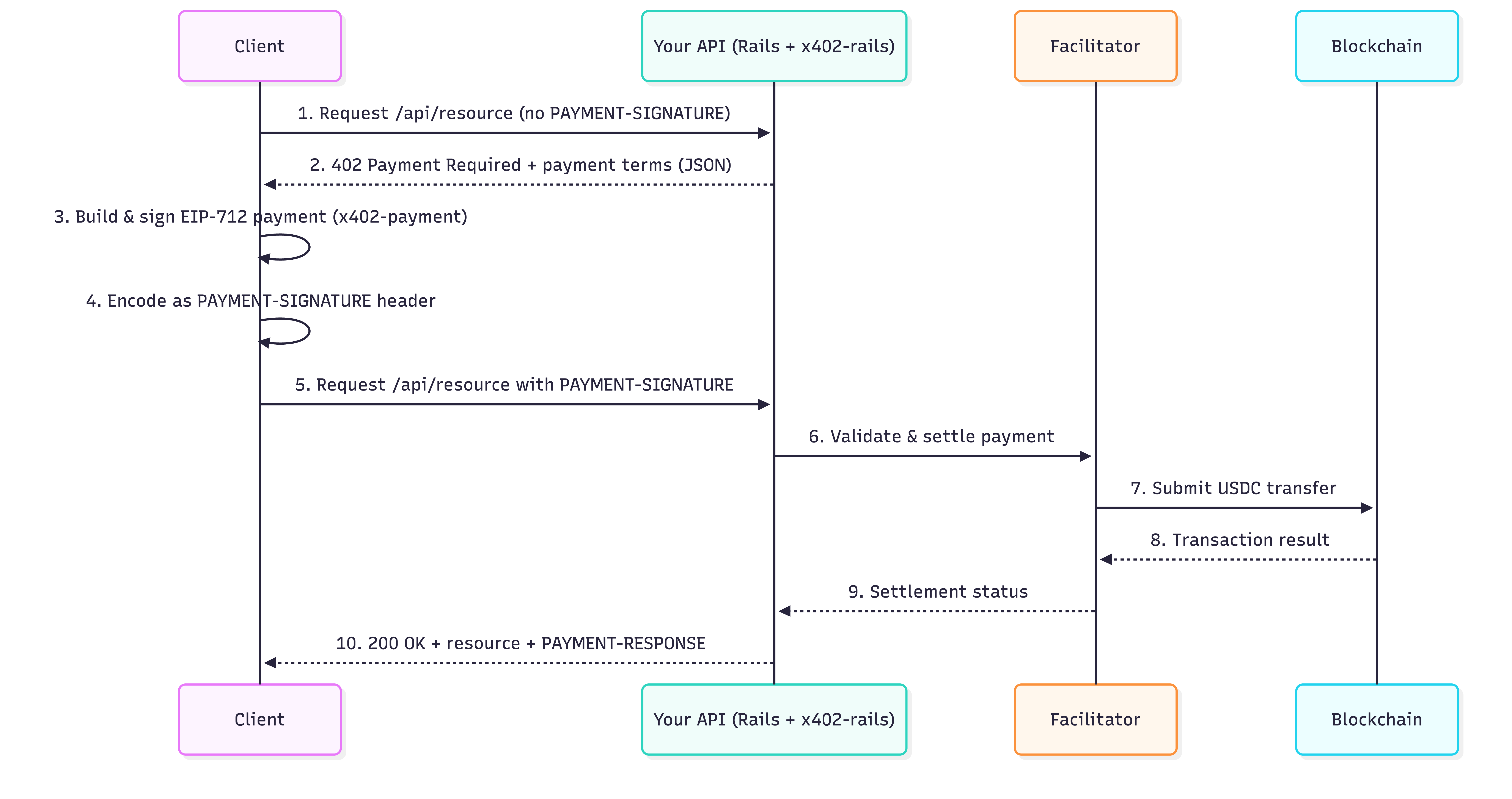
该协议在一个简单的循环中工作。 让我们逐步分解它,然后在可视图中查看它:
- 客户端调用你的 API。
事例 API 调用
curl -i http://localhost:3000/api/weather/paywalled_info- 你的服务器响应 HTTP 402 Payment Required 和支付说明。
支付请求响应示例
{
    "x402Version": 2,
    "error": "Payment required to access this resource",
    "resource": {
        "url": "http://localhost:3000/api/weather/paywalled_info",
        "description": "Payment required for /api/weather/paywalled_info",
        "mimeType": "application/json"
    },
    "accepts": [\
        {\
            "scheme": "exact",\
            "network": "eip155:84532", // Base Sepolia CAIP-2 网络标识符\
            "amount": "1000", // 最小单位的金额(USDC 为 6 位小数)\
            "asset": "0x036CbD53842c5426634e7929541eC2318f3dCF7e", // Base Sepolia 上的 USDC 合约\
            "payTo": "YourWalletAddressHere", // 接收钱包\
            "maxTimeoutSeconds": 600,\
            "extra": {\
                "name": "USDC",\
                "version": "2"\
            }\
        }\
    ],
    "extensions": {}
}- 客户端使用 EIP-712 对支付授权签名,并将其编码为
PAYMENT-SIGNATURE标头。
支付头示例
Payment Header (PAYMENT-SIGNATURE):
eyJ4NDAyVmVy... # Payment Authorization- 客户端使用该标头重新发送请求。
带有支付头的 API 调用示例
curl -i -H "PAYMENT-SIGNATURE: eyJ4NDAyVmVy..." http://localhost:3000/api/weather/paywalled_info- 你的服务器验证支付、在链上结算,并返回成功响应。
成功响应示例
{
    "temperature": 72,
    "condition": "sunny",
    "humidity": 65
}
为了简化 Ruby 中的操作,Quicknode 提供了两个 gems:
-
x402-rails (服务端):一个 Rails 引擎,提供中间件和控制器助手,可以轻松地为你的 API 端点添加“付费墙”。 它处理签名验证和支付结算。
-
x402-payments (客户端):一个用于生成复杂的 EIP-712 加密签名和
PAYMENT-SIGNATURE标头的辅助库,这些签名和标头是使用 x402 驱动的 API 所必需的。
使用 x402 和 Ruby on Rails 实现付费 API
在本节中,我们将使用一个示例应用程序,并解释如何在自己的 Rails 应用程序中设置和配置 x402。
Quicknode 的 qn-guide-examples 存储库中的这个 Rails 项目公开了一个天气 API 和一个高级 API,它们需要 USDC 支付才能访问天气数据。 它演示了:
- 不需要支付的免费端点
- 响应 402 和支付要求的付费端点
- 对 EVM 和 Solana 网络的多链支持
- 用于速度或更强保证的不同结算模式
技术演练
在深入研究代码之前,让我们从高层次理解应用程序的流程。 如果你对技术细节不感兴趣,请随时直接转到 快速入门 部分。
x402 配置
x402-rails gem 在 config/initializers/x402.rb 中初始化。 它读取接收钱包、协助者 URL、链、货币和乐观模式的环境变量,并设置你的全局配置。 一个典型的配置如下所示:
config/initializers/x402.rb
## config/initializers/x402.rb
X402.configure do |config|
  # 你的钱包地址(将收到付款)
  config.wallet_address = ENV.fetch("X402_WALLET_ADDRESS", "0xYourWalletAddressHere")

  # 处理链上结算的服务。
  # 使用公共协助者或你自己的。
  config.facilitator    = ENV.fetch("X402_FACILITATOR_URL", "https://www.x402.org/facilitator")

  # 要使用的区块链网络
  config.chain = ENV.fetch("X402_CHAIN", "base-sepolia")

  # 支付货币 (USDC 是标准)
  config.currency = ENV.fetch("X402_CURRENCY", "USDC")

  # 自定义链和Token注册
  config.register_chain(
    name: "polygon-amoy",
    chain_id: 80002,
    standard: "eip155"
  )

  config.register_token(
    chain: "polygon-amoy",
    symbol: "USDC",
    address: "0x41E94Eb019C0762f9Bfcf9Fb1E58725BfB0e7582",
    decimals: 6,
    name: "USDC",
    version: "2"
  )

  # ==========================================
  # 接受多种付款方式
  # ==========================================
  # 使用 config.accept() 指定要接受哪些链/货币。
  # 402 响应将包括所有接受的选项,允许客户端
  # 在任何受支持的链上支付。
  #
  # 如果没有进行 config.accept() 调用,则使用默认的链/货币。

  config.accept(chain: "base-sepolia", currency: "USDC")
  config.accept(chain: "polygon-amoy", currency: "USDC")
  config.accept(chain: "solana-devnet", currency: "USDC")

  # 结算模式:
  # false(非乐观):等待链上确认
  # true(乐观):立即响应,在后台结算
  config.optimistic     = ENV.fetch("X402_OPTIMISTIC", "true") == "true"
end
这些设置告诉 x402-rails 在哪里接收 USDC 付款、使用哪个链以及是乐观响应还是等待结算。 你还可以在控制器中覆盖每个端点的这些设置,我们很快就会看到。
什么是协助者?
协助者是 x402 支付流程的关键部分。 在客户端发送带有签名支付授权的请求后,服务器会将该授权传递给协助者。 然后,协助者:
- 验证签名授权
- 构建实际的 USDC 转账交易
- 支付提交交易的 gas 费
- 将交易发送到区块链
- 将结算详细信息返回给你的 API
这种设计允许客户端支付 API 访问费用,而无需自己提交区块链交易。 他们只签署一条消息(没有 RPC 调用、没有 gas 估算、没有钱包连接过程)。
你可以依赖 x402.org 上的公共协助者,或者如果你想要自定义结算行为、日志记录或支持其他链,可以部署自己的实例。
控制器中的付费墙强制执行
向 API 端点添加付费墙就像调用 x402_paywall 辅助方法一样简单。 x402-rails gem 将此助手注入到你的控制器中,允许你使用一行代码来要求付款。 在示例 WeatherController 中,paywalled_info action 在返回数据之前收取 $0.001 USDC。
app/controllers/api/weather_controller.rb
  class WeatherController < ApplicationController
    # Paywalled endpoint (requires payment)
    # 付费端点(需要支付)
    def paywalled_info

      # 1. REQUIRE PAYMENT: This line protects the endpoint.
      # 1. 需要付款:此行保护端点。
      # It will return a 402 response if payment is missing or invalid.
      # 如果缺少或无效的支付,它将返回 402 响应。
      x402_paywall(amount: 0.001)

      # 2. STOP EXECUTION: If the paywall rendered a 402, stop.
      # 2. 停止执行:如果付费墙呈现 402,则停止。
      return if performed?

      # 3. ACCESS DATA: If payment was successful, continue.
      # 3. 访问数据:如果支付成功,请继续。
      # Payment info is available in the request environment.
      # 支付信息可在请求环境中获得。
      payment_info = request.env["x402.payment"]

      render json: {
        temperature: 72,
        condition: "sunny",
        humidity: 65,
        paid_by: payment_info&.[](:payer),
        payment_amount: payment_info&.[](:amount),
        network: payment_info&.[](:network),
        payment_info: payment_info
      }
    end

    # Free endpoint (no paywall)
    # 免费端点(无付费墙)
    def public_info
      # This endpoint has no paywall and is free.
       # 此端点没有付费墙,是免费的。
      render json: {
        message: "This endpoint is free!",
        location: "San Francisco",
        timezone: "PST"
      }
    end
  end
路由
示例应用程序的路由在 config/routes.rb 中定义。 这是每个 API 端点(包括免费端点和付费端点)映射到其相应控制器 action 的位置。 天气 API 显示了 x402_paywall 的直接使用,而高级 API 使用 before_action 在多个端点上应用付费墙。
config/routes.rb
Rails.application.routes.draw do
  # Define your application routes per the DSL in https://guides.rubyonrails.org/routing.html
   # 在 https://guides.rubyonrails.org/routing.html 中定义你的应用程序路由的 DSL

  # Reveal health status on /up that returns 200 if the app boots with no exceptions, otherwise 500.
  # 在 /up 上显示运行状况,如果应用程序在没有异常的情况下启动,则返回 200,否则返回 500。
  # Can be used by load balancers and uptime monitors to verify that the app is live.
  # 可供负载均衡器和正常运行时间监控器用来验证应用程序是否已启动。
  get "up" => "rails/health#show", as: :rails_health_check

  # x402 Payment Protocol Test Endpoints
  # x402 支付协议测试端点
  namespace :api do
    # Weather API endpoints (direct x402_paywall usage)
    # 天气 API 端点(直接使用 x402_paywall)
    get "weather/paywalled_info", to: "weather#paywalled_info"
    get "weather/paywalled_info_sol", to: "weather#paywalled_info_sol"
    get "weather/forecast", to: "weather#forecast"
    get "weather/public", to: "weather#public_info"

    # Premium API endpoints (before_action usage)
    # 高级 API 端点(before_action 用法)
    resources :premium, only: [ :index, :show ] do
      collection do
        get :free
      end
    end
  end
end
替代付费墙(可选)
如果多个端点需要相同的支付逻辑,则无需在每个 action 中重复 x402_paywall。 相反,你可以使用 before_action 过滤器一次性应用它。 这就是高级 API (app/controllers/api/premium_controller.rb) 的结构方式; 它将相同的付费墙应用于多个 action,从而保持控制器干净和一致。
app/controllers/api/premium_controller.rb
module Api
  class PremiumController < ApplicationController
    # Example of a paywall applied to multiple actions (show and index)
    # 已应用于多个 action(show 和 index)的付费墙示例
    before_action :require_payment, only: [:show, :index]

    def index
      payment_info = request.env["x402.payment"]

      render json: {
        message: "Premium content list",
        items: ["Item 1", "Item 2", "Item 3"],
        paid_by: payment_info&.[](:payer)
      }
    end

    def show
      payment_info = request.env["x402.payment"]

      render json: {
        message: "Premium content details",
        id: params[:id],
        content: "This is premium content that requires payment",
        paid_by: payment_info&.[](:payer)
      }
    end

    def free
      render json: {
        message: "This premium controller endpoint is free",
        sample: "Here's a sample"
      }
    end

    private

    def require_payment
      x402_paywall(amount: 0.005, chain: "eip155:84532")
    end
  end
end
多链支持(可选)
x402 协议旨在跨多个区块链网络工作,并且每个端点都可以指定自己的链设置。 这使你可以灵活地根据你的用例接受不同网络上的支付。
在示例应用程序中,WeatherController 的 paywalled_info_sol 端点要求在 Solana devnet 上进行支付,方法是将默认链覆盖为 solana-devnet。
app/controllers/api/weather_controller.rb
module Api
  class WeatherController < ApplicationController
    def paywalled_info_sol
      x402_paywall(
        amount: 0.001,
        chain: "solana:EtWTRABZaYq6iMfeYKouRu166VU2xqa1", # Solana devnet CAIP-2 identifier
        currency: "USDC",
        solana_fee_payer: "FuzoZt4zXaYLvXRguKw2T6xvKvzZqv6PkmaFjNrEG7jm",
        wallet_address: "EYNQARNg9gZTtj1xMMrHK7dRFAkVjAAMubxaH7Do8d9Y"
      )
      # ...
    end
  end
end
处理支付错误(可选)
为了提供清晰的错误消息,你可以捕获 x402-rails 引发的特定异常。 这已在 app/controllers/application_controller.rb 中设置。
app/controllers/application_controller.rb
class ApplicationController < ActionController::API
  # Application-wide x402 error handling
  # 应用程序范围内的 x402 错误处理
  rescue_from X402::InvalidPaymentError, with: :render_payment_error
  rescue_from X402::FacilitatorError, with: :render_facilitator_error
  rescue_from X402::ConfigurationError, with: :render_config_error

  private

  def render_payment_error(exception)
    render json: {
      error: "Payment Error",
      message: exception.message,
      type: "invalid_payment",
      status: 402
    }, status: :payment_required
  end

  def render_facilitator_error(exception)
    Rails.logger.error("[x402] Facilitator error: #{exception.message}")

    render json: {
      error: "Payment Service Unavailable",
      message: "Unable to process payment. Please try again.",
      type: "facilitator_error",
      status: 503
    }, status: :service_unavailable
  end

  def render_config_error(exception)
    Rails.logger.fatal("[x402] Configuration error: #{exception.message}")

    render json: {
      error: "Service Configuration Error",
      message: "Payment system not properly configured",
      status: 500
    }, status: :internal_server_error
  end
end
我们已经介绍了将 x402 支付集成到 Ruby on Rails 应用程序中的关键技术方面。 现在,让我们开始使用示例项目。
快速开始
首先,克隆 Quicknode 示例项目:
步骤 1:克隆并安装依赖项
## Clone the repository
## 克隆存储库
git clone https://github.com/quiknode-labs/qn-guide-examples.git
cd qn-guide-examples/rails/x402-micropayments

## Install dependencies
## 安装依赖项
bundle install
步骤 2:配置环境变量
将 .env.example 文件复制到 .env 并更新以下变量。 有关详细信息,请参见文件中的注释。
cp .env.example .env步骤 3:启动服务器
启动服务器:
bin/rails server -p 3000你的 API 现在在 http://localhost:3000 上可用。 现在,我们需要学习如何生成有效的支付签名来访问带付费墙的端点。
生成 x402 客户端支付
如前所述,客户端需要生成有效的支付签名(PAYMENT-SIGNATURE 标头)才能访问带付费墙的端点。 示例项目包括一个简单的脚本,用不同的语言生成不同用例的支付签名:
- Ruby:
generate-payment.rb - TypeScript:
generate-payment.ts - Python:
generate-payment.py
我们将在此指南中使用 Ruby 脚本,但其他语言的过程类似,更多详细信息可在项目的 README 文件中找到。
使用 Ruby 支付生成器
该脚本使用 bundler/inline 自动安装必要的依赖项,因此你无需设置单独的 Gemfile。
generate_payment.rb
## ... (see full script in the project)
## ...(请参阅项目中的完整脚本)

## Load .env file if it exists
## 如果存在,请加载 .env 文件
require 'dotenv'
Dotenv.load

## Configuration
## 配置
PRIVATE_KEY = ENV.fetch('X402_TEST_PRIVATE_KEY', '0xYourPrivateKeyHere')
PORT = ENV.fetch('PORT', '3000')
PAY_TO = ENV.fetch('X402_WALLET_ADDRESS', 'YourWalletAddressHere')
CHAIN = ENV.fetch('X402_CHAIN', 'base-sepolia')

## Configure x402-payments gem
## 配置 x402-payments gem
X402::Payments.configure do |config|
  config.private_key = PRIVATE_KEY
  config.chain = CHAIN
  config.default_pay_to = PAY_TO
  config.max_timeout_seconds = 600
end

## Generate payment header
## 生成支付头
## The gem handles all the EIP-712 signing internally
## 该 gem 在内部处理所有 EIP-712 签名
begin
  payment_header = X402::Payments.generate_header(
    amount: 0.001,  # $0.001 in USD
    resource: "http://localhost:#{PORT}/api/weather/paywalled_info",
    description: "Payment required for /api/weather/paywalled_info"
  )
end

## ... (see full script in the project)
## ...(请参阅项目中的完整脚本)
运行脚本
现在,运行脚本:
ruby generate_payment.rb该脚本将输出支付头,你可以在客户端中使用该支付头。
注意: 脚本中支付的最大超时时间设置为 600 秒。 你可以根据你的用例调整此值。 否则,支付将在 600 秒后过期。
测试付费墙
由于我们已经设置了服务器和支付生成器,因此我们现在可以测试完整的支付流程,并了解 x402 在实践中如何工作。
为你的钱包充值
要测试支付,你需要在 Base Sepolia 测试网上有一些测试 USDC。 你可以从 Circle USDC faucet 获取一些免费的测试 USDC。
带付费墙的端点
首先,尝试在没有支付头的情况下访问带付费墙的端点:
curl -i http://localhost:3000/api/weather/paywalled_info你应该收到 402 响应,其中包含以下 JSON 载荷:
{
    "x402Version": 2,
    "error": "Payment required to access this resource",
    "resource": {
        "url": "http://localhost:3000/api/weather/paywalled_info",
        "description": "Payment required for /api/weather/paywalled_info",
        "mimeType": "application/json"
    },
    "accepts": [\
        {\
            "scheme": "exact",\
            "network": "eip155:84532",\
            "amount": "1000",\
            "asset": "Asset Contract Address", // e.g., USDC on Base Sepolia\
            "payTo": "Recipient Address", // The receiving wallet\
            "maxTimeoutSeconds": 600,\
            "extra": {\
                "name": "USDC",\
                "version": "2"\
            }\
        }\
    ],
    "extensions": {}
}
现在,使用 Ruby 脚本(或你首选的支付生成器)生成的支付头来访问带付费墙的端点:
curl -i -H "PAYMENT-SIGNATURE: eyJ4NDAyVmVy..." http://localhost:3000/api/weather/paywalled_info你应该收到 200 响应,其中包含以下 JSON 载荷:
{
    "temperature": 72,
    "condition": "sunny",
    "humidity": 65,
    "paid_by": "0x...",
    "payment_amount": "1000",
    "network": "base-sepolia"
    // ...
}
恭喜! 你已成功将 x402 支付集成到 Ruby on Rails 应用程序中。 现在,你可以使用支付头来访问带付费墙的端点,并享受小额支付的好处。
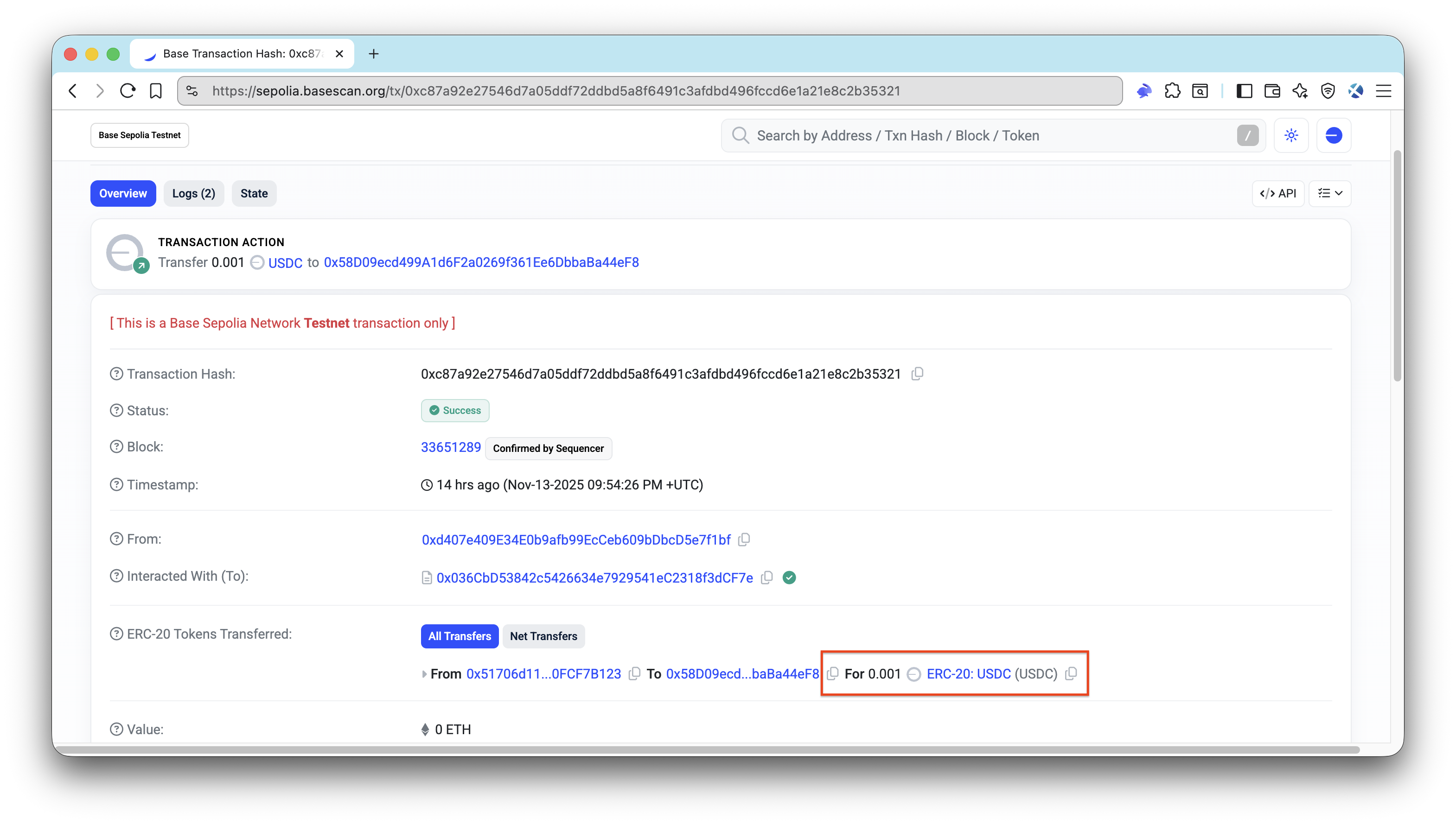
使用区块链浏览器(例如,Base Sepolia Explorer)来验证支付交易是否已在区块链上成功结算。
免费端点
你还可以尝试访问免费端点:
curl -i http://localhost:3000/api/weather/public此端点不需要支付头,因此你应该收到 200 响应,其中包含以下 JSON 载荷:
{
    "message": "This endpoint is free!",
    "location": "San Francisco",
    "timezone": "PST"
}
结论
你现在已经对 x402、x402-rails 和 x402-payments 如何在实际 Rails 应用程序中协同工作有了实际的理解。
从这里,你可以:
- 实现你自己的业务逻辑
- 针对每个端点或每个 HTTP 方法引入不同的价格
- 准备好生产后,从测试网切换到主网
- 探索托管你自己的协助者以获得更多控制权
如果你遇到困难或有疑问,请在我们的 Discord 中提出。 通过在 X (@Quicknode) 或我们的 Telegram 公告频道 上关注我们,了解最新信息。
我们 ❤️ 反馈!
如果你对新主题有任何反馈或要求,请 告诉我们。 我们很乐意收到你的来信。
- 原文链接: quicknode.com/guides/x40...
- 登链社区 AI 助手,为大家转译优秀英文文章,如有翻译不通的地方,还请包涵~